
Pause Cora in the pill
Pause Cora puts the conversation on hold: Cora stops talking, your microphone goes off, and nothing from your screen is sent to Cora until you resume. The chat stays open, and when you resume Cora picks up the thread where you left it.
Pause Cora
-
While the pill is green, click Pause Cora, the round button with two bars beside the X on the left of the pill.
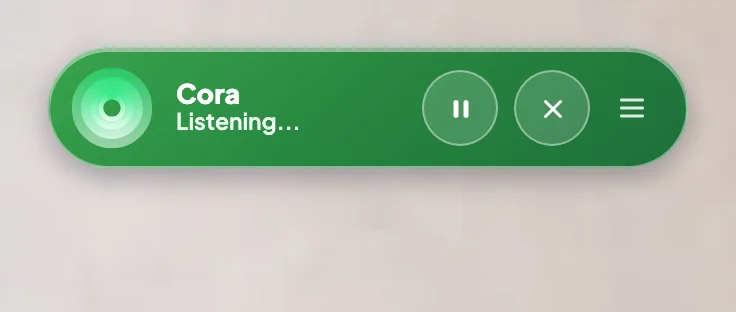
1 Pause Cora sits beside End conversation. -
Check the pill: it turns grey, the pause button turns orange, and the status reads Paused. Cora stops mid-sentence and cannot hear you.
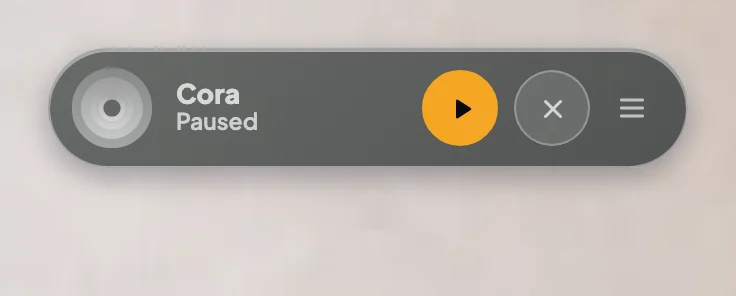
2 Grey with an orange button means paused.
Resume
-
Click the orange button again, now Resume Cora.
-
Listen as Cora picks up where you both were, such as the step you were on. Carry on talking to Cora as before.
What happens next
The conversation carries on in the same chat. To stop altogether instead, click End conversation; the pill goes purple and the chat is saved under Chats.
Common questions
Can Cora see my screen while paused?
No. While the pill says Paused, nothing from your screen is sent to Cora. See What Cora can see while the pill is open.
Should I pause or end the conversation?
Pause for a short break in the same task. End the conversation when the task is done or you are moving on to something else.
What happens if I go back to the dashboard while paused?
Back to Dashboard and Close Pill Mode end the conversation, paused or not, and the chat is saved under Chats.