
Stop Cora mid-sentence
The pill has no separate presentation mode: when Cora is talking you through something, you can cut in by speaking, pause Cora, or stop the conversation with the X. In a call it is different, because your microphone is off while Cora presents a slide, so you stop Cora with Pause meeting.
Stop Cora in the pill
-
To cut in while Cora is talking, start speaking. Cora stops and listens, the same as a person would.
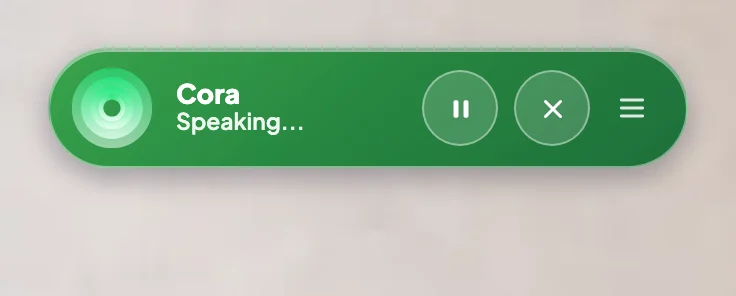
2 Pause Cora. 3 End conversation, the X. -
To stop Cora for a while, click Pause Cora. Cora stops mid-sentence and the pill reads Paused until you click Resume Cora.
-
To stop the conversation, click End conversation, the X. The pill goes purple and reads Click to activate. The chat is saved under Chats.
Stop Cora while presenting in a call
-
While Cora or a colleague presents a slide, your microphone is off, so Cora cannot hear you. Wait for the question, when your microphone comes back on, or click Pause meeting in the middle of the bar to stop Cora straight away.

4 Pause meeting stops Cora at once. -
If the slide has a button for you, such as Approve, you can click it while Cora is still talking. Cora stops and the call moves on.
-
To leave the call, click End call, then Yes, end call. See End a call.
What happens next
A paused pill or call waits for you, and Cora picks up where things were when you resume. An ended conversation is saved under Chats, and an ended onboarding call or strategy session can be rejoined from your dashboard.
Common questions
I saw a Stop presentation button on coravision.ai. Where is it in the app?
That button belongs to the demonstration of the pill on the website, not to the app. In the app, the same place on the pill holds Pause Cora and End conversation.
Can I say "stop" instead?
In a call, yes, while Cora is waiting for your answer: saying "stop" or "pause" on its own pauses the call. While Cora presents, your microphone is off, so use Pause meeting. In the pill, start speaking and Cora stops to listen.
Why is my microphone off while Cora presents in a call?
So a cough or a noise in the room cannot cut Cora off or be taken as your answer. It comes back on as soon as Cora asks you something.