
Where your designs are saved
Your designs are kept in your CoraVision account and listed under Your designs in the Design Studio, on any computer you sign in on. Every change Dune makes is kept as a version, and anything you export is a copy saved to your computer.
Find a design
-
In the sidebar, click Marketing Plan, then Design Studio.
-
Open the panel on the left with the arrow at its foot if it is folded. Your designs lists every design, the most recently changed first. Under each name is its state, such as Draft or Saved.
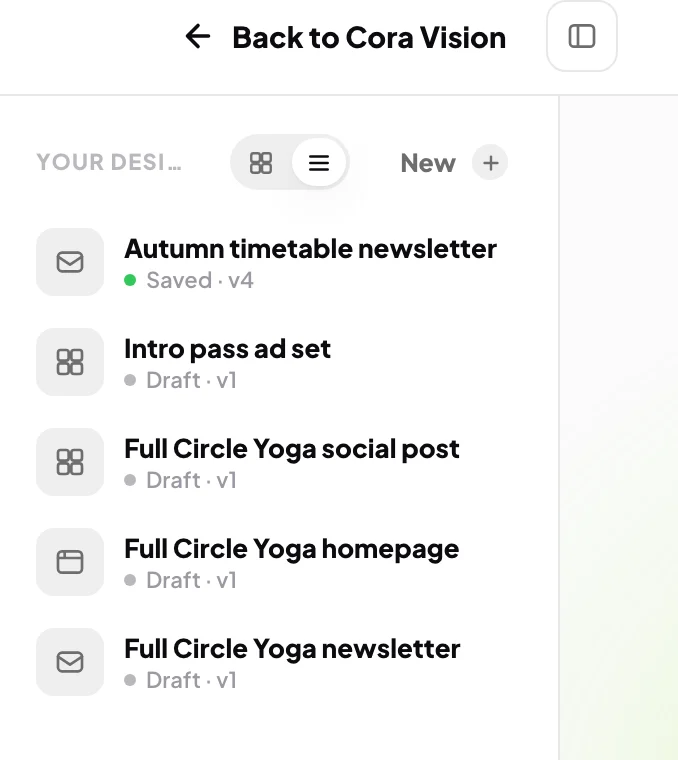
2 Your designs, newest change first. 3 Grid or list. -
To see small pictures of each design, click the grid button beside Your designs. Click the list button to go back.
-
Click a design to open it. To rename it, click its name at the top of the studio, type the new name and press Return or Enter.
Save and go back to a version
-
After a change you want to keep, click Save at the top right. A message confirms which version is kept.
Save before you leaveIf you leave a design with changes you have not saved, CoraVision asks Leave without saving?. Click Stay and then Save, or Leave without saving and the design goes back to its last saved state.
-
To look at an earlier version, click the Versions tab on the right, then View beside the version you want.
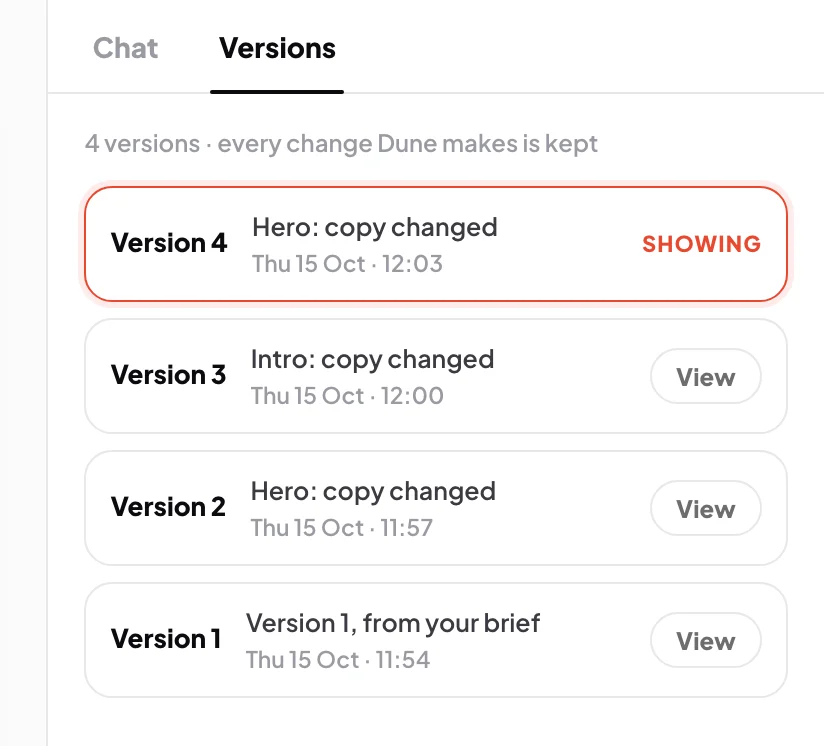
6 Every change is a version you can view.
Find what you exported
-
Open your Downloads folder in Finder on a Mac, or File Explorer on Windows. Downloaded ad sizes are in a folder named after the design. A downloaded email or page is an HTML file named after the design.
What happens next
Come back to a design any time to change it again with Dune. A design you made from an action plan step with Dune completes that step when you save it.
Common questions
Can I delete a design?
Not yet. There is no button to delete or archive a design. If you need one removed, send us a message from the contact page.
Are my designs in My Files?
No. There is no My Files page yet; your designs are only in the Design Studio. See My Files.
Where did the designs I did not make come from?
When you first open the studio, Dune turns the email, website and social pages of your brand style guide into three starter designs. If your guide is rebuilt, starters you have not changed or saved are replaced with new ones.
Can I open my designs on another computer?
Yes. They are saved in your account, not on your computer, so they appear wherever you sign in to CoraVision.