
The screen recording indicator on a Mac
macOS shows a screen recording indicator in the menu bar whenever an app is allowed to look at your screen, and CoraVision turns it on for exactly as long as a session with Cora runs. It appears when you start a chat in the pill and goes away when you end it; nothing is saved by it, and it is macOS's way of keeping you informed.
- CoraVision has Screen Recording switched on in System Settings. If not, see Allow CoraVision to see your screen on a Mac.
When it appears
-
Turn Cora on in the pill to start a chat. The pill turns green, and the screen recording indicator appears near the right end of the menu bar. It stays for the whole session, because CoraVision watches your screen for changes while Cora is on.
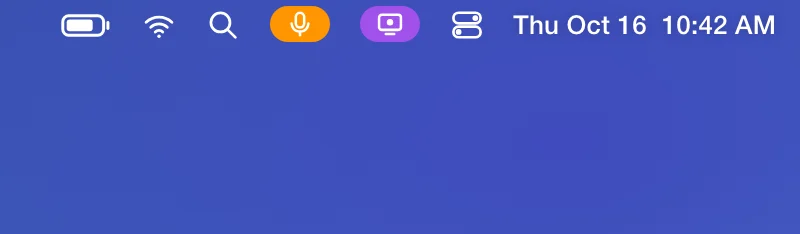
1 The indicator shows while a session with Cora runs. -
Click the indicator to see which app is looking at your screen. CoraVision is listed while your session runs.
-
It also appears when Cora talks you through connecting Google or Meta, from a call or from Connectors, while you sign in on their pages. It goes when you are back in CoraVision.
When it goes away
-
On the pill, click End conversation, or open the menu and click Close Pill Mode. CoraVision lets go of your screen and the indicator goes away.
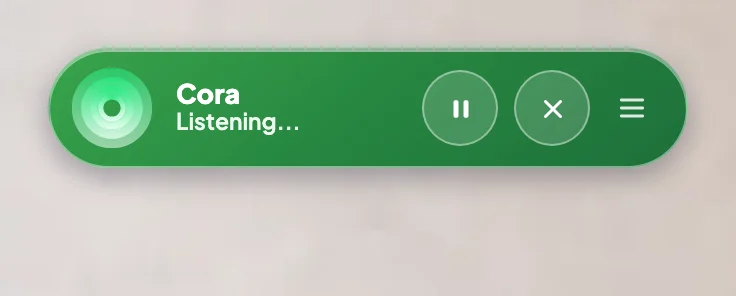
4 End conversation ends the session and the indicator. While Cora is pausedThe indicator can stay on while the pill reads Paused, because the session is still open. Nothing from your screen is sent to Cora until you click Resume Cora.
If it stays on after a session
-
Look at the pill. If it is green, a session is still running: click End conversation.
-
If the indicator is still there, quit CoraVision with Command and Q. CoraVision cannot look at your screen while it is closed.
-
If it still shows, another app is using your screen. Click the indicator to see which one.
What happens next
The indicator comes back each time you start a session with Cora. From macOS 15, macOS may also ask from time to time whether CoraVision can keep seeing your screen; click Allow to carry on. What Cora does with what Cora sees is in What Cora sees, and when.
Common questions
Does the indicator mean CoraVision is recording a video?
No. macOS shows the same indicator for any app that can look at the screen. Cora gets still images, used to answer you in the moment and not saved to your account.
Does it show during a call?
Only while Cora talks you through connecting Google or Meta. The rest of the call Cora does not look at your screen.
Is there an indicator on Windows?
Windows does not ask for screen permission, so watch the pill instead: green means Cora can see your main display, and purple means Cora sees nothing.