
Put your account into hibernation
Hibernation is a pause instead of an end. When the month you have paid for finishes, your account sleeps for one, two or three months at a small monthly fee (US$9 a month at the time of writing, plus GST in Australia). Nothing is deleted, your price is kept, and your plan restarts by itself on the day you chose. You can wake it early at any time.
- Hibernation is offered on monthly plans. It is not offered on a yearly plan, or while a plan change is waiting for your renewal.
- It is offered as the second screen of the cancel. You get there through Cancel my plan; you are not cancelling anything until the last screen.
- While your account hibernates you cannot use Cora, the pill or your projects. If you only want to pay less and keep using Cora, see Change your plan.
Take hibernation
-
At the bottom of the sidebar, click Settings, then My Plan & Usage. Scroll to the foot of the page and click Cancel my plan.
-
On Would a smaller plan suit you better?, click No, I still want to cancel. On Plus this screen is skipped.
-
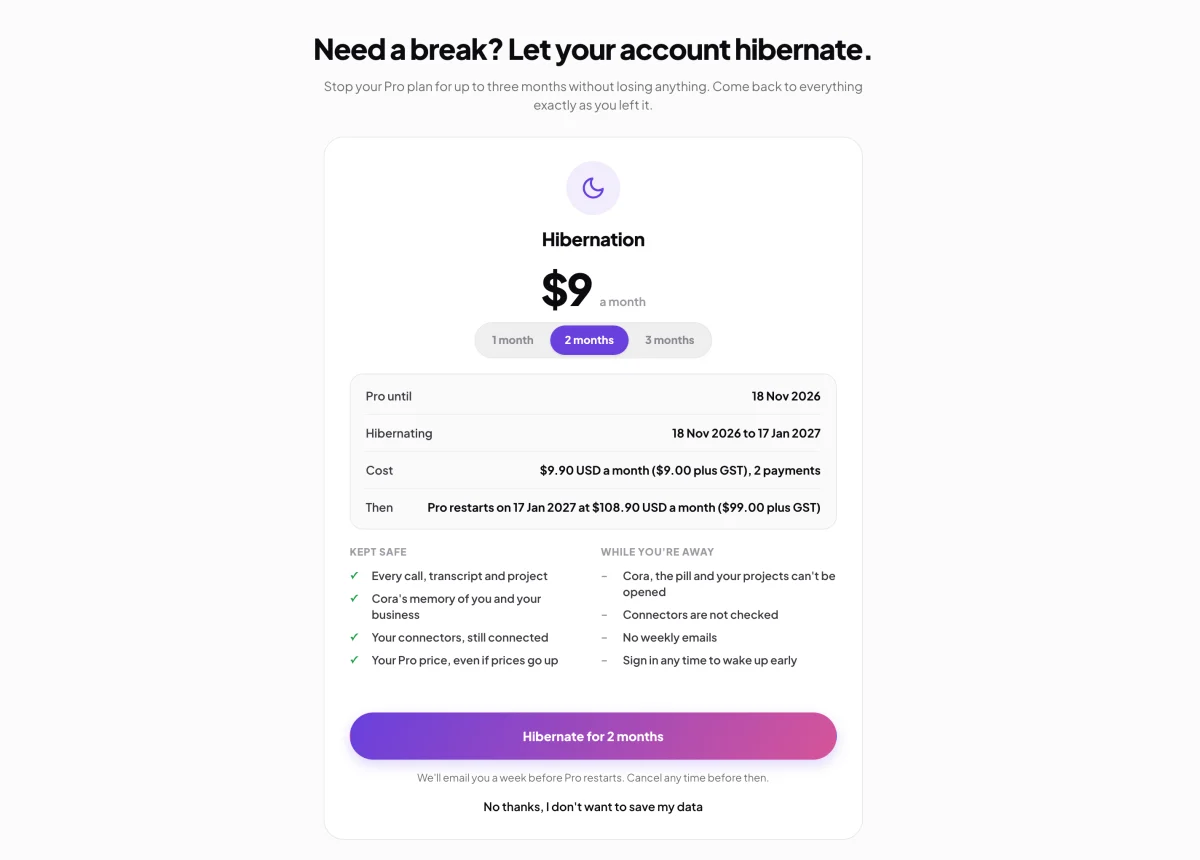
On Need a break? Let your account hibernate., choose 1 month, 2 months or 3 months. The card updates: the day your plan runs to, the dates your account hibernates, the cost (the fee a month, and how many payments), and the day your plan restarts at its usual price. Kept safe lists what is kept and While you're away what you cannot do.
3 Choose the months. 4 Take it. -
Click Hibernate for the months you chose. Nothing is charged today. Your account hibernates on the date confirms the plan, the fee and the restart. Click Back to My Plan. We email you Your account hibernates on that date straight away.
-
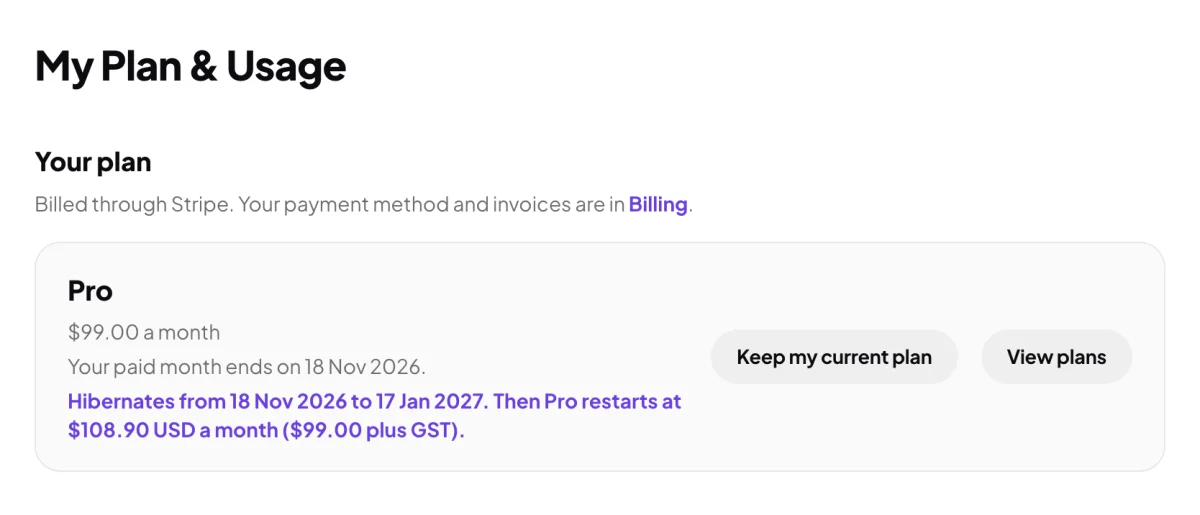
Until it starts, My Plan & Usage reads Hibernates from the start date to the end date, then the day your plan restarts. To undo it before it starts, click Keep my current plan. We email you Your hibernation is cancelled.
5 Undo it any time before it starts.
While your account hibernates
On the day your paid month ends, hibernation begins and the fee for the first month is taken from your saved card. The whole app becomes one screen: Your account is in hibernation until the end date, with the dates, the fee, the day your plan restarts, and any credit you have kept. Two buttons: Take my account out of hibernation and Sign out.
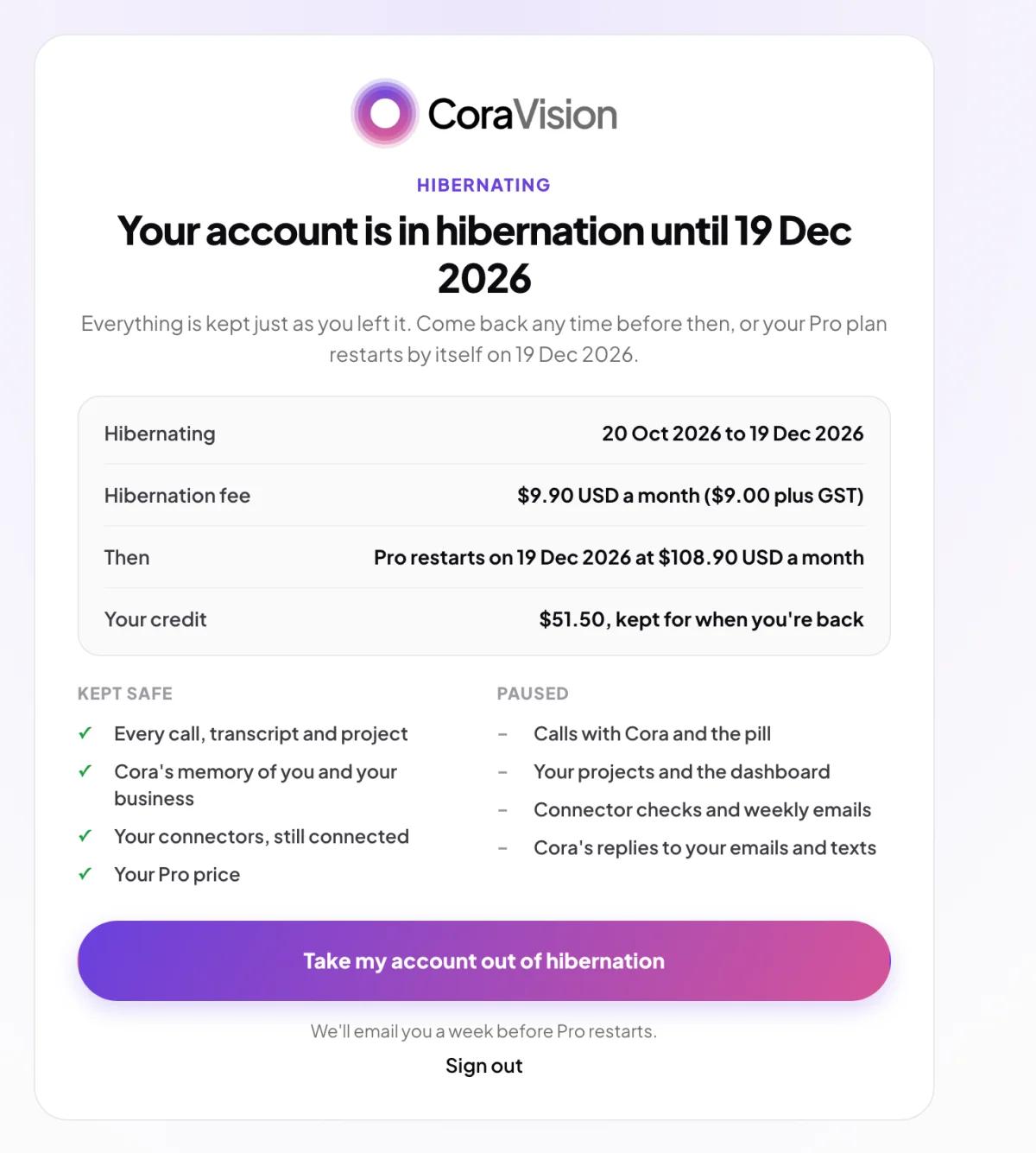
- Kept safe: every call, transcript and project, Cora's memory of you and your business, your connectors (still connected), your credit, and your plan's price even if prices go up.
- Paused: calls with Cora and the pill, your projects and the dashboard, connector checks and weekly emails, and Cora's replies to your emails and texts (Cora answers that your account is hibernating).
- A call that is already running when hibernation begins finishes first.
- Each month of hibernation is charged on its date, and each payment has an invoice in Billing.
When it ends
A week before the end date we email you Your plan restarts on that date. On the day, your plan restarts by itself at its usual price, charged to your saved card, and the app opens as normal. If you do not want the plan back, wake up before the date and cancel, or cancel after it restarts. A hibernating account cannot be cancelled from the hibernation screen.
Wake up early
-
On the hibernation screen, click Take my account out of hibernation. The plans page opens with your own plan marked Your plan and its button reading Come back to it. You can choose another plan instead.
-
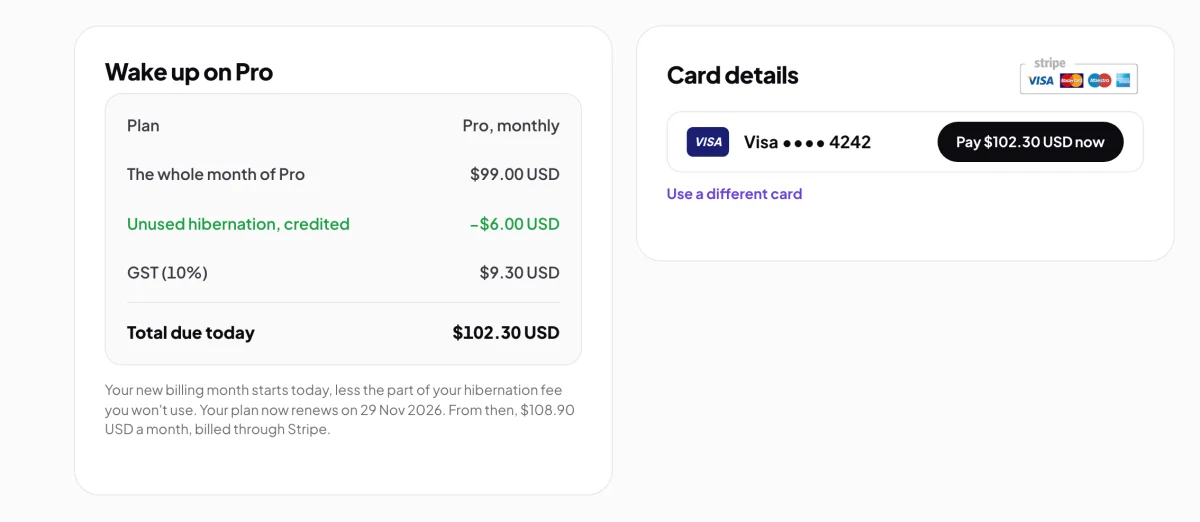
Click the plan. The Payment page, Wake up on your plan, shows the whole month of your plan, less the part of your hibernation fee you will not use, plus GST, and the total today. Pay with the card shown, or Use a different card.
2 A new month of your plan, less the hibernation you will not use. -
Welcome back confirms it, and the app opens as normal. Your new billing month starts today, so your renewal date moves to a month from now. Your weekly allowance picks up where it was.
Common questions
When is the fee charged?
Nothing is charged when you take hibernation. The first month's fee is charged on the day your paid month ends and hibernation begins, and the next on the same day each month after that, for the months you chose.
The hibernation fee didn't go through. What happens?
The hibernation screen says so, with an Update my card button. Add a card that works and the fee is taken. Your account stays in hibernation meanwhile.
My card was refused when I tried to wake up.
Nothing is charged and your account stays in hibernation. Try again, or use a different card. The restart on your chosen date is kept as it was.
Can I cancel instead, once hibernation has begun?
Not from the hibernation screen. Wake your account (a new month of your plan starts) and cancel from My Plan & Usage, or let the plan restart on the date and cancel then.
Is anything deleted while my account hibernates?
No. Hibernation keeps everything, and the 30-day deletion that follows a cancelled plan never starts while an account hibernates. See Cancel your plan.