
Your payment didn't go through
When a plan payment is refused by your card, we email and text you, and the app shows one screen, Payment needed, until the month is paid. Everything is kept just as you left it. Pay with the card on file, or add a new card and pay, and your account opens again at once.
- Check the card first: its expiry date, its limit, and whether your bank blocked the charge. The screen names the card we tried.
- Your card details go into a form run by Stripe, our payment provider. They never reach CoraVision's servers.
The Payment needed screen
From the next time the app checks your account (within a few minutes, or when you sign in), the whole window is Your payment didn't go through: your plan, the amount (with GST shown separately in Australia), the day we tried, the card we tried, and any credit you have kept. Kept safe lists what is kept and Paused until paid what you cannot do meanwhile: calls with Cora and the pill, your projects and the dashboard, connector checks and weekly emails, and Cora's replies to your emails and texts. The only other way off the screen is Sign out.
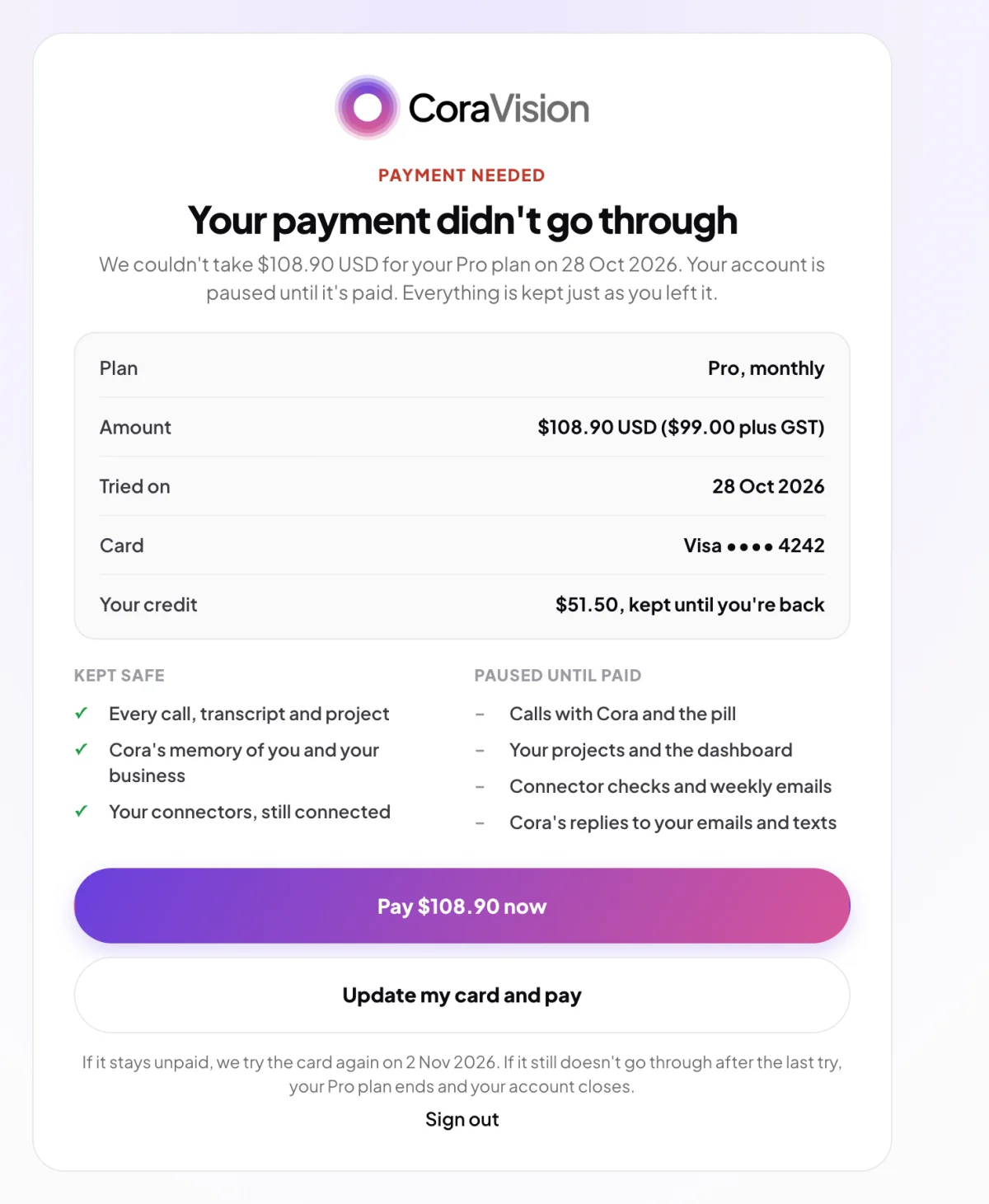
Pay with the card on file
-
Click Pay the amount now. The Payment page opens on Pay what's owed, with the month you owe, GST and the total due today, and your saved card on the right.
-
Click Pay the amount USD now next to the card. If it goes through, Payment successful confirms your plan is running again and that your renewal date has not changed, and we email your receipt. Click Continue and the app opens as normal.
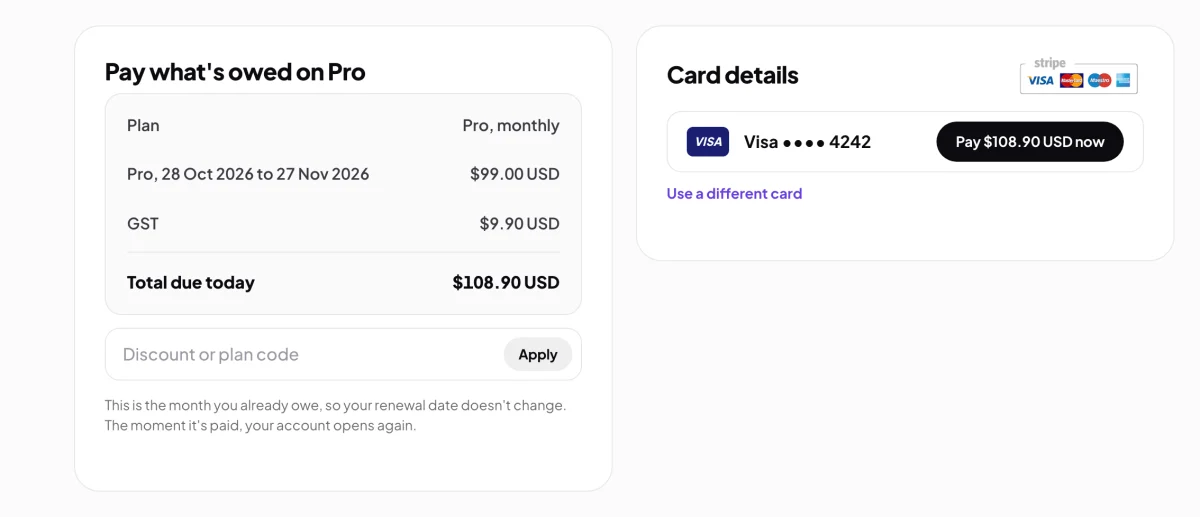
2 The month you owe, nothing more. -
If the card is refused again, Your card was not accepted says nothing was charged and your account is still paused. Click Try again, or go back and use Update my card and pay.
Update your card and pay
-
On the Payment needed screen, click Update my card and pay. The Payment page opens with an empty card form.
-
Type the card number, expiry date and security code, then click Save card and pay. The new card is saved as your default and charged the amount owed; it then pays your renewals. Payment successful confirms it, and Continue opens the app.
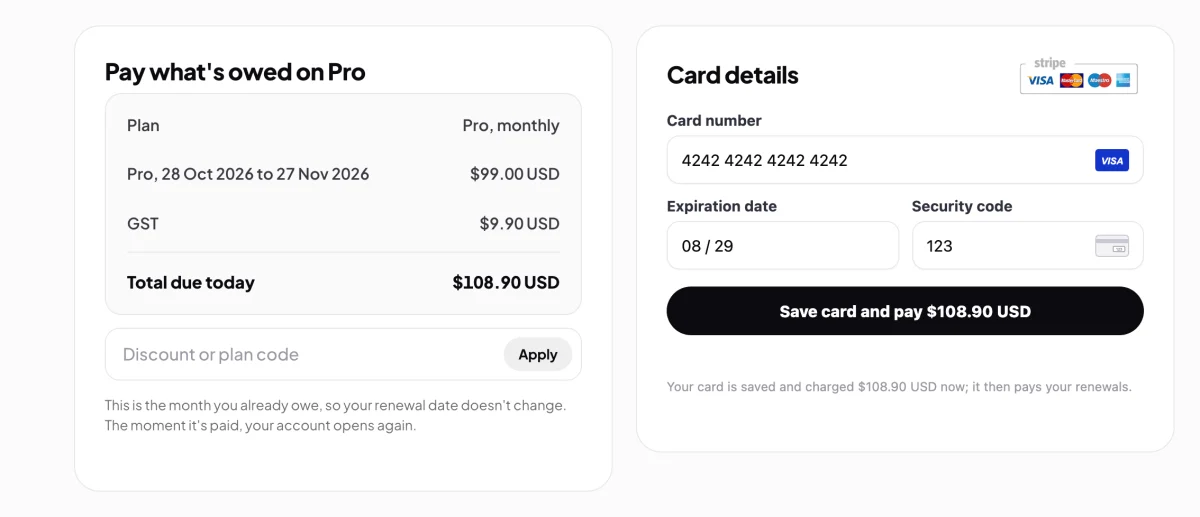
2 The new card pays now and from then on.
If it stays unpaid
Stripe tries your card again over the following days; the screen names the next day it will try. If a try goes through, your account opens again by itself and we email your receipt. If the last try also fails, your plan ends and we email you Your plan has ended. You can start a plan again at any time from the plans page. Thirty days after a plan ends, your content is deleted unless you start a plan again before then: see After your plan ends.
Common questions
Why is the whole app locked for one missed payment?
A plan is paid in advance. When the month's payment does not arrive, the month cannot run on credit, so the app pauses until it is paid. Nothing is deleted, and paying opens it again at once.
Does paying change my renewal date?
No. You are paying the month you already owe, so your renewal stays where it was.
I have credit left. Why can't I use it?
Credit pays for usage beyond your weekly allowance, not for the plan itself. It is kept, and shown on the screen, until the month is paid.
What about auto top-up and the hibernation fee?
A refused auto top-up does not pause your account; you get an email and auto top-up waits for a working card (see Auto top-up). A refused hibernation fee is handled on the hibernation screen: see Put your account into hibernation.
Can I cancel instead of paying?
You can cancel so the plan does not renew after this period, from My Plan & Usage once the month is paid, or by contacting us. Stripe may still try your card for the month that is owed. See Cancel your plan.