
Background noise keeps interrupting Cora
If Cora keeps stopping mid-sentence, answers something you never said, or cuts out when nobody spoke, Cora is hearing sound from the room, or Cora's own voice from your speakers, and taking it as you. The fixes below take a few minutes, and the most effective one is a pair of headphones.
Try this first: wear headphones
-
Put on headphones, earbuds or a headset, and choose them as your speaker. On laptop speakers, Cora's voice reaches your microphone and Cora hears it. Any headphones stop that; a headset with its own microphone is best. See Cora works best in a quiet place.
-
Move away from the noise if you can: close the door, turn off music or the TV, and keep away from people talking.
In a call: check the room noise slider
-
At the bottom of the call window, to the left of the buttons, find the slider from Quiet Room to Noisy Room. Drag it towards Noisy Room. The further right it sits, the louder a sound has to be before it cuts Cora off, and the change works straight away.

3 Slide towards the room you are actually in. NoteThe slider starts at the Noisy Room end on each computer, so if Cora is still cut off there, it has been moved, or the sound is very close to your microphone. Your setting is kept for your next call on this computer. If Cora stops answering you, slide it back towards Quiet Room: the same setting decides how loud you have to speak.
-
While someone near you is talking and you are only listening, click Mute. Click Unmute when you want to speak.
On Windows: turn on noise suppression
On a MacThese steps are for Windows only. Go to step 8.
-
Click Start, then Settings, then System, then Sound.
-
Under Input, click your microphone.
-
Turn on Noise suppression. On some computers it is called Voice Clarity or Noise cancellation, depending on the maker.
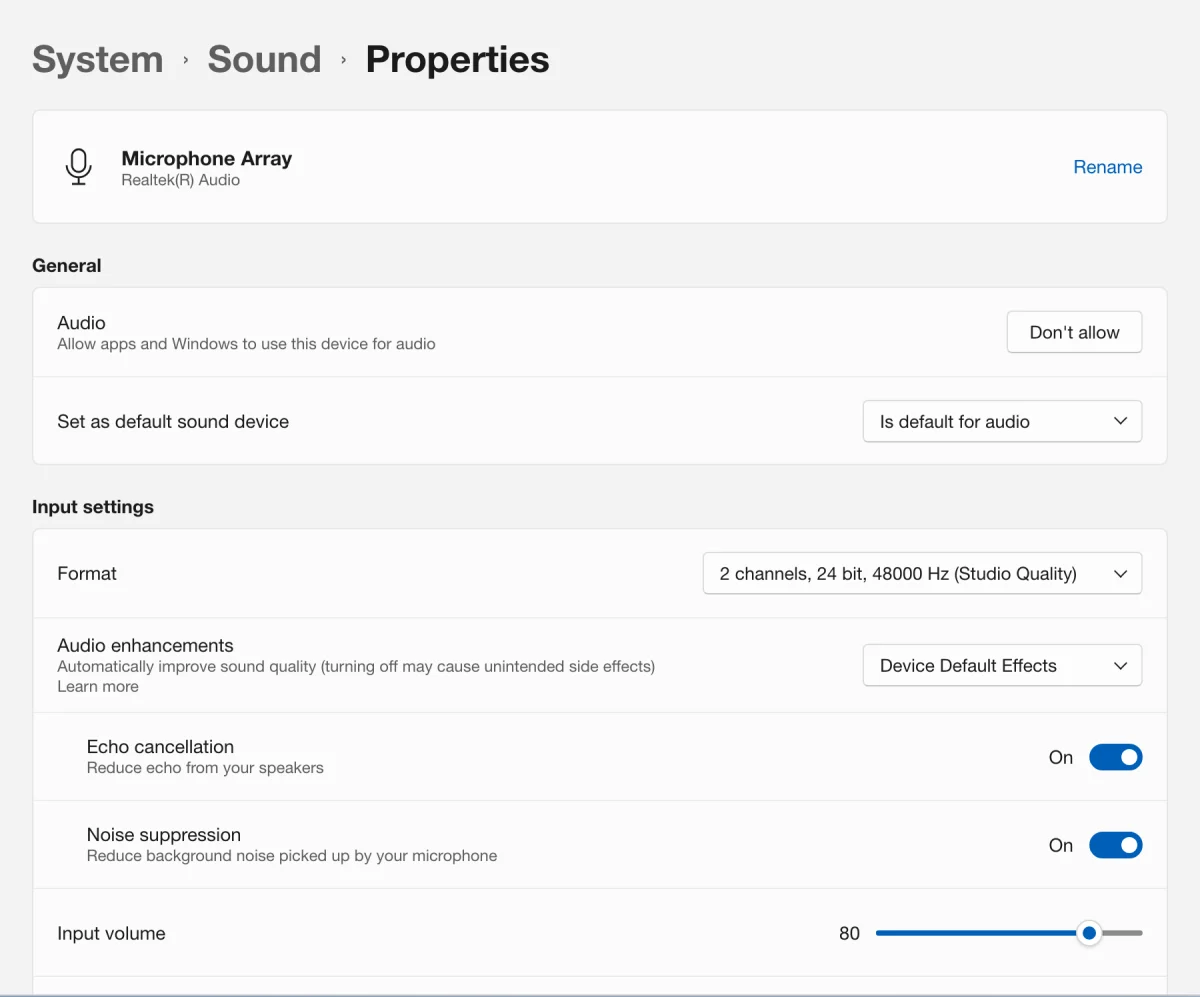
7 The name differs a little between laptops.
In a chat with the pill
-
When a noisy moment is coming, click Pause Cora on the pill. Cora can neither hear nor speak until you click Resume Cora. The pill already filters steady background sound, but a voice nearby can still reach Cora.
-
If none of this helps, send us a message from the contact page. Tell us your computer (Mac or Windows), what you hear Cora say or do, your microphone, and the version at the bottom of your dashboard's sidebar.
What happens next
With headphones on and the slider set for your room, Cora finishes every sentence and only stops when you speak to Cora. If Cora now struggles to hear you, see Cora can't hear me: fix your microphone.
Common questions
Is there a room noise slider in the pill?
No. The slider is in the call window and applies to calls. In the pill, use headphones and Pause Cora.
Do noise-cancelling headphones fix it?
They help with Cora's voice, because it no longer reaches your microphone. Noise cancelling protects your ears from the room, but it does not stop room noise reaching your microphone; a headset microphone close to your mouth does more.
I skipped the noise suppression step when I signed up. Can I go back?
Yes. It is a Windows setting, so you can turn it on any time in Windows Settings, System, Sound, as in steps 5 to 7.